How to Apply for Learner Driving License Online in Pakistan 2026
How to Apply for Learner Driving License
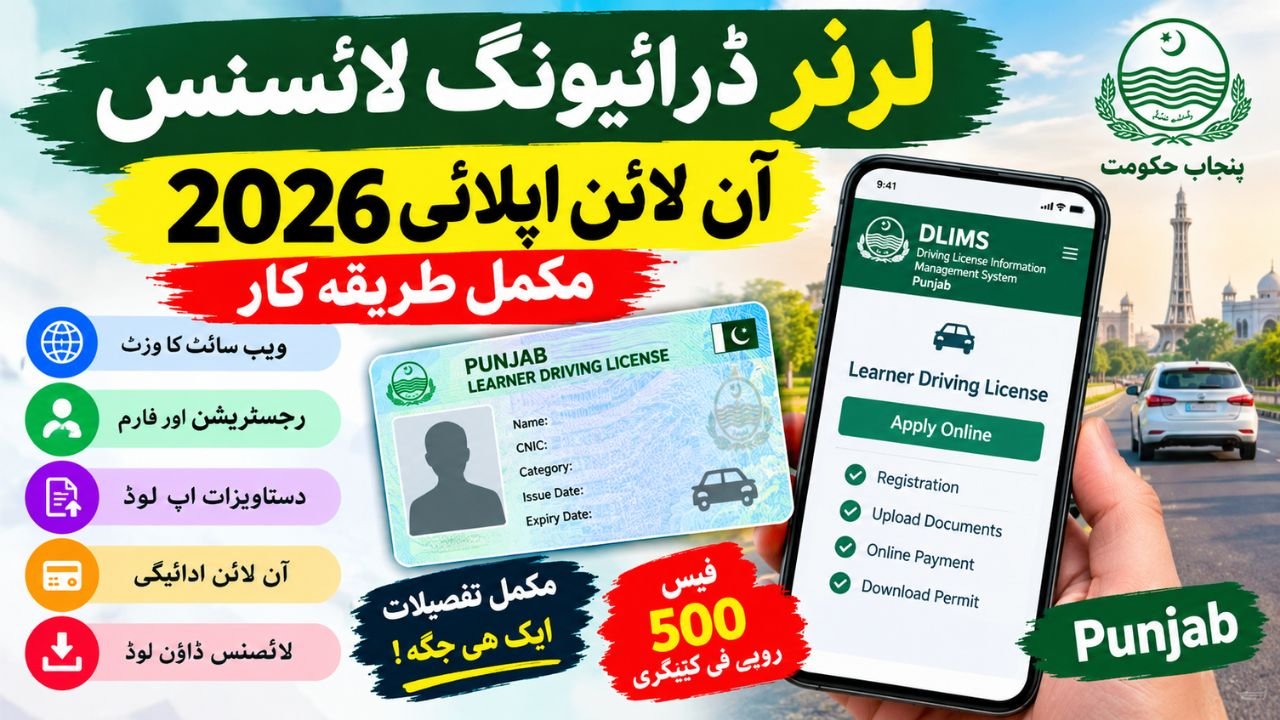
Applying for a learner driving license online has become more convenient for residents of Punjab, Pakistan. Instead of making an initial visit to a licensing office, eligible applicants can use the official Driving License Information Management System (DLIMS) and Punjab’s Dastak platform to start their application, submit the required information, and pay the applicable fee. The online service helps reduce paperwork and makes the process easier to follow.
In 2026, the main development in Punjab is the integration of driving license services with the Dastak platform, which offers online applications and a separate doorstep service option. According to ProPakistani’s report published on June 15, 2026, citizens can use Dastak for learner permits, renewals, duplicate licenses, and other driving license services. However, applicants should check the official portal for the current process and charges before submitting an application.
This guide explains how to apply for a learner driving license online, which documents you need, how to pay the fee, and how to download your learner permit after approval. It also explains the difference between the older online application process and the services available through Dastak in 2026.
Also Read ; Punjab T-Cash Card Online Apply 2026
Learner Driving License Online Apply 2026: Latest Update
A learner driving license is an initial permit for a person who wants to learn to drive a vehicle legally. It is different from a regular driving license, which generally requires the applicant to complete the applicable testing and licensing requirements.
Punjab introduced its online learner licensing service through DLIMS as a joint initiative involving the Punjab Information Technology Board (PITB) and Punjab Traffic Police. The official PITB announcement dated December 15, 2023, confirmed that citizens could apply through the digital system or visit designated service centers.
By 2026, Dastak had become another official route for accessing these services. The Dastak website provides a learner driving license application option, with self-service and doorstep service choices. The exact charges and document requirements may depend on the selected service.
Applicants should remember that online registration does not remove the need to meet the legal eligibility requirements. A learner permit also does not give someone unrestricted permission to drive independently.
How to Apply for Learner License Online in Pakistan
The application process depends on the province where you live because driving license services are managed through provincial systems. For residents of Punjab, the official DLIMS and Dastak websites are the relevant starting points.
Before beginning the application, keep your identity documents ready and make sure the information you enter matches your official records. A clear photograph and accurate personal details can help prevent avoidable delays during the application process.
Step 1: Open the Official DLIMS or Dastak Website
Visit the official DLIMS Punjab website or the Dastak Punjab service portal. Find the learner driving license service and review the available application options.
Use the official government website rather than an unfamiliar website offering to issue a permit. If the service has moved to another official platform, follow the instructions provided by the government portal.
Step 2: Create an Account or Enter Your Applicant Details
Select the new learner application option and follow the registration instructions. Depending on the portal, you may need to create an account or provide your CNIC and date of birth to continue.
Enter your name, date of birth, contact information, address, and other requested details carefully. If the system retrieves information from an existing record, review it before moving to the next stage.
Step 3: Complete the Learner Driving License Application Form Online
The learner driving license application form online asks for information needed to process your permit. Select the correct vehicle category, such as motorcycle or car, where the portal provides that option.
Check every field before submitting the form, especially your CNIC number, date of birth, mobile number, and category selection. Incorrect information can create problems with verification or require you to correct the application later.
Step 4: Upload the Required Documents
Upload the documents requested by the official application system. The current DLIMS guidance lists a face photograph and images or scanned copies of the front and back of the original CNIC. It also mentions a medical certificate signed by a government doctor for applicants over 50 years of age.
Dastak may display different document instructions according to the service selected and the applicant’s circumstances. Follow the checklist shown on the actual application rather than uploading unnecessary documents or relying on an outdated guide.
Step 5: Generate the Payment Reference and Pay the Fee
After completing the required information, follow the portal’s instructions for generating a payment reference, such as a PSID where applicable. Review the amount displayed before making payment through a supported payment channel.
The official DLIMS online learner application guidance lists a fee of Rs. 500 per category. However, the amount shown on your application should be checked carefully because the selected service or platform may display additional charges.
Keep the payment receipt or transaction confirmation until the application is completed. Never transfer money to an individual’s personal account or share your banking PIN or password with someone claiming to arrange your learner permit.
Step 6: Check Your Application and Download the Permit
Once the application and payment have been processed, follow the portal’s instructions to view your learner permit. The DLIMS guidance states that a digital copy can be made available through the applicant’s account after successful completion of the online process.
Open the issued document and check that your personal information and vehicle category are correct. Save the digital copy and print it if you need a paper version. If the permit does not appear after payment, check your application status and contact the official licensing service for assistance.
Learner License Apply Online Punjab 2026: Which Portal Should You Use?
Punjab applicants may come across both DLIMS and Dastak when searching for online learner permit services. Both are associated with official Punjab government driving license services, but the current application route and available options should be confirmed on the relevant website.
| Service detail | Official information for 2026 |
|---|---|
| Main licensing system | DLIMS Punjab |
| Government service platform | Dastak Punjab |
| Learner application fee | Rs. 500 per category, according to DLIMS online guidance |
| Identity document | Original CNIC, with the required images where requested |
| Photograph | Face photograph or live photograph, depending on the portal |
| Medical certificate | DLIMS guidance specifies one for applicants over 50; additional requirements may apply |
| Payment method | Follow the payment instructions and reference displayed by the official portal |
| Digital permit | Available through the account after successful processing, according to DLIMS guidance |
| Alternative assistance | Check official licensing centers or the service options displayed by Dastak |
The figures and requirements in this table are based on published official portal guidance available at the time of writing. Always confirm the final fee and document checklist on the live application before paying.
Punjab Learner Driving License Online Registration: Required Documents
Preparing the correct documents before starting Punjab learner driving license online registration can make the process easier. The precise checklist depends on the application route and the applicant’s circumstances.
The main items to prepare are:
- CNIC: Keep your original Computerized National Identity Card available and upload clear images of both sides if requested.
- Photograph: Prepare a recent, clear face photograph that meets the portal’s requirements. Dastak’s self-service information specifies a live photograph with a white background and the upper shoulders visible.
- Medical certificate: Check whether a medical certificate is required for your age and vehicle category. The DLIMS online guidance specifies a certificate signed by a government doctor for applicants above 50 years of age.
- Personal information: Make sure your name, date of birth, address, and contact details are correct.
- Payment information: Keep access to a supported payment method so you can complete the transaction against the reference generated by the official system.
A passport or B-Form may be relevant to certain Dastak service arrangements, but applicants should not assume that every document listed for a special service is required for every standard online application. Use the document checklist shown for your specific application.
Learner License Fee in Pakistan 2026: How Much Do You Need?
People often search for the learner license fee in Pakistan 2026 because they want to know the total cost before applying. However, fees and service arrangements can differ by province, vehicle category, and application route.
For Punjab, the DLIMS online learner application guidance lists Rs. 500 per category, including separate categories such as a motorcycle or car. Applicants using Dastak should also review any platform or service charges displayed during the application.
For example, someone applying for both motorcycle and car categories should not automatically assume that one category’s fee covers both. Check the number of categories selected and the total amount generated by the official system.
The following table summarizes the published fee information without treating unverified or outdated amounts as current rates.
| Fee item | Amount or rule |
|---|---|
| DLIMS learner permit fee | Rs. 500 per category |
| Motorcycle category | Confirm the current amount on the application |
| Car category | Confirm the current amount on the application |
| Multiple categories | The fee may apply separately to each category |
| Dastak platform or service charges | Check the amount displayed for the selected service |
| Final amount payable | Use the official payment reference and verify its total |
Important: The final amount shown on your official application or PSID should be checked before payment. Do not rely on an old screenshot or a fee mentioned by an unofficial agent.
Learner Driving License Online Payment Method
After completing the application, follow the official payment instructions. The DLIMS online application guidance describes payment through supported ATM, online banking, or mobile banking channels after the payment reference has been generated.
The exact options available can depend on the payment reference and the services supported by your bank or payment provider. Make sure the amount and reference match your own application before confirming the transaction.
After payment, save the receipt or transaction ID. If your account still shows an unpaid status, allow time for the transaction to be reflected and then check the application again. If the problem continues, contact the official licensing service with your application details and payment proof.
How to Download Learner Driving License Online
Applicants who have completed the process often want to know how to download learner driving license online. According to the published DLIMS guidance, the digital permit is made available through the account used for the application after the form and payment have been completed successfully.
Sign in to your account and look for the issued learner permit or download option. If the document is available, open it and check the name, identity details, category, and validity information. Save a copy on your device and print it if a paper copy is useful.
If you cannot find the document, do not submit a duplicate application immediately. First, check whether your payment has been confirmed and whether the application is still being processed. Contact the official service if the permit remains unavailable.
Learner Permit Print Online Pakistan: What Should You Check?
When using the learner permit print online Pakistan option, make sure the downloaded document is complete and readable. A printout should not be treated as proof of a valid permit unless the permit has actually been issued by the authorized system.
Check these details before printing:
- Your name and identity information are accurate.
- The correct vehicle category appears on the permit.
- The issue and expiry dates, where displayed, are readable.
- The document has been issued through the official system.
- Any conditions or restrictions printed on the permit are understood and followed.
Keep the permit available when required, and follow the rules applicable to learner drivers. A learner permit is not the same as a full driving license, and applicants must meet the relevant legal conditions before driving.
Learner License Apply Online by CNIC: Common Problems and Solutions
A learner license apply online by CNIC search usually means that applicants want to start an application using their identity information. The CNIC helps the system identify the applicant, but it does not replace all the other application steps.
CNIC details are not accepted: Check the number and date of birth you entered, and make sure the information matches your official record. If the error continues, contact the licensing service.
Photograph or document upload fails: Use a clear image in the format and size accepted by the portal. Avoid blurry photographs, cut-off documents, or images with missing corners.
Payment has been deducted but the status has not changed: Keep your receipt, check the transaction status, and allow the payment system time to update. Contact official support if the payment remains unconfirmed.
The permit is not available for download: Check the application status and make sure the payment has been recorded. If the application is still pending, follow the portal’s instructions rather than creating another application.
The website is not opening: Try again later or use the official Dastak service page. Avoid unofficial websites that imitate government services or ask for unnecessary personal information.
Online Driving License Registration Punjab: What Changed From 2025 to 2026?
The main change applicants should understand is the expansion of the official service options, not an assumption that every fee or eligibility rule has changed.
In 2025, applicants could use the existing DLIMS online learner application process in Punjab. The process involved providing applicant information, uploading documents, generating the required payment reference, and paying the fee.
In 2026, Dastak provides an additional official route for accessing driving license services. ProPakistani reported on June 15, 2026, that Punjab had linked Dastak with DLIMS services, allowing citizens to apply for learner permits and access other licensing services through the app.
| Topic | 2025 process | 2026 position |
|---|---|---|
| Online learner application | Available through DLIMS | DLIMS guidance remains available, with Dastak also offering learner services |
| Applicant information | Enter personal and identity details | Enter the details requested by the selected official platform |
| Document submission | Upload the required documents | Follow the current portal-specific checklist |
| Payment | Follow the online payment instructions | Verify the current fee and payment reference before paying |
| Digital permit | Available through the online process | Check the account or service portal after successful processing |
| Doorstep option | Depends on the available service arrangements | Dastak lists self-service and doorstep service options |
This comparison describes the documented service arrangements; it does not mean that every rule, fee, or document requirement changed between 2025 and 2026. Applicants should check the latest official instructions rather than assuming that older information remains correct.
Important Note Before Applying for a Learner Permit
A learner permit is an initial licensing document, not permission to ignore traffic laws or drive without the required supervision and conditions. Before applying, check the minimum age and eligibility requirements for your vehicle category, and confirm whether any medical or other documents are needed.
Use only the official DLIMS or Dastak platform for Punjab applications. Review the fee displayed by the system, keep your payment receipt, and avoid sharing your CNIC images or personal information with unknown agents. If an application is rejected or delayed, contact the official service instead of paying someone who promises guaranteed approval.
Rules, charges, and online service options can change. For applications made in 2027, check the official portal again before relying on the 2026 fee or procedure described in this guide.
Frequently Asked Questions
1. How to apply for learner driving license online in Punjab?
Visit the official DLIMS or Dastak website, select the learner driving license service, provide the requested personal details, upload the required documents, and complete the payment process. Follow the portal’s instructions to access the permit after successful processing.
2. What is the learner driving license fee in Punjab in 2026?
The published DLIMS online learner application guidance lists Rs. 500 per category. Check the final amount on the official application because additional platform or service charges may apply depending on the route selected.
3. Can I apply for a learner license using my CNIC?
Yes, the Punjab online application process requests identity information, including CNIC details. You may also need a photograph and other documents depending on your circumstances and the selected service.
4. How long does it take to receive an online learner permit?
DLIMS guidance says the digital permit can be available after the form is completed and payment is made. Actual processing or display may depend on the application and payment status, so check your account for confirmation.
5. Can I download and print my learner driving license?
If the permit has been issued and is available in your account, follow the portal’s download instructions, check the document details, and print a readable copy if needed.
6. Is Dastak an official option for learner license applications?
Yes. The Punjab government’s Dastak platform lists learner driving license services and provides self-service and doorstep service options. Applicants should read the requirements and charges shown for their selected service.
7. Can I use the same process in every province of Pakistan?
No. Driving license services are managed through provincial systems, so the portal, application procedure, fees, and requirements may differ. The steps in this article focus on Punjab.
8. Will the 2026 learner license fee remain the same in 2027?
That cannot be guaranteed. Applicants in 2027 should confirm the current fee and application requirements on the official portal before submitting their application.
Conclusion
Applying for a learner driving license online in Punjab is more straightforward when you use the official portal, prepare your documents in advance, and follow the payment instructions carefully. DLIMS provides the online application guidance, while Dastak offers another official route to access learner license services.
Before submitting your application, confirm the current fee, eligibility rules, and required documents on the live government website. Once your permit is issued, download it from the official account, verify its details, and follow all learner driving conditions until you qualify for a regular license.