
How-to-pay-suthra-punjab-bill-online 2026 – WMC Bill Check, 20-Digit PSID & Payment Guide
How to Pay Suthra Punjab Bill Online 2026
The Suthra Punjab bill online payment system helps residents find information about sanitation charges and check their bills through the official digital service. If you have received a Suthra Punjab sanitation bill, you should first verify the bill details before making a payment. The official Suthra Punjab website provides an online bill-checking facility that uses the 20-digit PSID printed on the bill.
This guide explains how to pay Suthra Punjab bill online, how to check your bill, where to find your PSID, and what to do if your bill shows incorrect information. It also explains the available official support channels and the important differences between older billing arrangements and the 2026 sanitation fee model.
More Read: Pakistan Fuel Subsidy 2026
Suthra Punjab Bill Check Online 2026 – Latest Information
Suthra Punjab is a Punjab government cleanliness and waste-management initiative designed to improve sanitation services in urban and rural communities. Its work includes waste collection, street cleaning, drain cleaning, and other cleanliness operations.
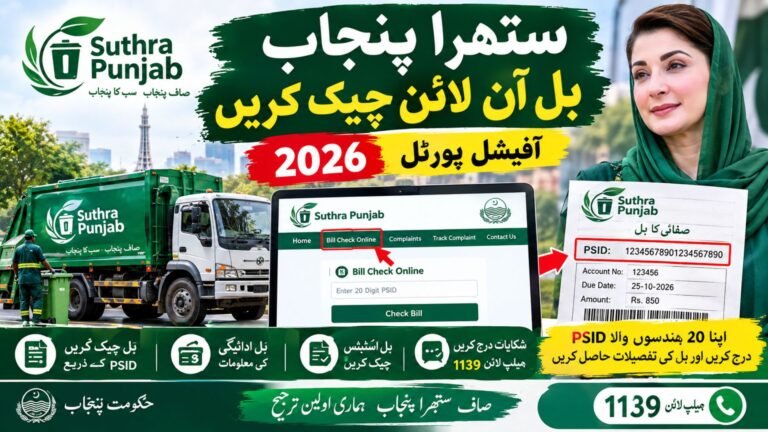
The official website provides a WMC Suthra Punjab bill check online facility. Residents can use this service to verify their current bill by entering the 20-digit PSID shown on their bill.
In September 2026, Dawn reported that the Punjab government was moving towards a uniform sanitation fee collection model for urban areas through an agreement involving the Excise, Taxation and Narcotics Control Department and the Suthra Punjab Authority. The reported charges depend on property size and commercial category.
For this reason, residents should check the current bill rather than rely on an old fee list or an amount shared through social media.
Suthra Punjab Bill Online Payment – How to Check Your Bill
If you want to complete a Suthra Punjab bill payment online, start by checking your bill through the official website.
Follow these steps:
- Open the official Suthra Punjab website: https://suthra.punjab.gov.pk/
- Find the Bill Check Online or bill-verification option.
- Keep your current sanitation bill ready.
- Enter the 20-digit PSID printed on the bill.
- Submit the details and review the information displayed by the system.
- Confirm the amount and payment reference before proceeding.
The official bill-checking facility helps you verify your bill, but checking a bill and paying it are two different actions. Follow the payment instructions provided through the official service or an authorised payment channel.
Do not assume that a bill has been paid simply because it appears on the screen. After completing a transaction, save the receipt or transaction reference and check the payment status.
How to Pay WMC Bill Online
The WMC bill online payment process should begin with verification of the bill and its payment reference. WMC stands for Waste Management Company, a term associated with local waste-management services.
Before paying your bill, make sure that the PSID and amount match your current bill. Then use the payment method officially provided for that bill.
If your bill or the official portal does not clearly identify an accepted payment channel, contact Suthra Punjab support before transferring money. Do not assume that every mobile wallet, banking application, or payment service accepts this bill.
Once payment is completed, retain the transaction receipt. If the bill remains unpaid in the online system, allow time for the transaction to update and contact support if the problem continues.
Suthra Punjab Bill Status Check and Verification
A Suthra Punjab bill status check can help you determine whether the displayed bill information needs further attention. Start by opening the official bill-verification page and entering your PSID.
Check the following details carefully:
- The PSID matches the number printed on your bill.
- The amount shown is consistent with the current bill.
- The billing period and property category are correct, where displayed.
- Your previous payment has been recorded, if you have already paid.
- Any outstanding balance is explained by the available billing information.
If your payment has already been made but the bill still appears outstanding, keep your transaction receipt and contact the official helpline for guidance.
More Read: Punjab Mazdoor Card 2026
Suthra Punjab Bill by CNIC or Reference Number
Some residents search for Suthra Punjab bill by CNIC because they expect to retrieve their bill using their identity card number. However, the official bill-checking instructions identify the 20-digit PSID as the required detail.
Similarly, a search for Suthra Punjab bill by reference number may refer to a payment reference, account number, or PSID. These terms are not necessarily interchangeable.
Use the exact identifier requested by the official portal. Never enter your CNIC, bank password, PIN, or one-time verification code on an unofficial website claiming to provide a bill-checking service.
Suthra Punjab Bill Download and Duplicate Bill
Residents may also search for Suthra Punjab bill download or a Suthra Punjab duplicate bill when the original bill is lost, damaged, or unavailable.
First, visit the official bill-checking portal and verify whether your current bill can be retrieved using the PSID. If the portal displays the bill, use any available official option to save or print the details.
If you cannot retrieve the bill online, contact Suthra Punjab support or your relevant local office. Ask them how to obtain a duplicate bill or confirm the outstanding amount.
Do not download a bill from an unknown website just because it uses the Suthra Punjab name. A duplicate bill should contain the correct payment reference and current amount.
Suthra Punjab Sanitation Bill – Facts and Figures for 2026
The sanitation fee structure is important because the amount can depend on the type and size of a property. The following figures were reported by Dawn on September 25, 2026, in its coverage of the uniform urban sanitation fee collection model.
| Property or business category | Reported monthly fee |
|---|---|
| Urban residential property up to 5 marla | Rs. 300 |
| Urban residential property above 5 to 10 marla | Rs. 500 |
| Urban residential property above 10 to 20 marla | Rs. 1,000 |
| Urban residential property above 20 to 40 marla | Rs. 2,000 |
| Urban residential property above 40 marla | Rs. 4,000 |
| Small urban business | Rs. 500 |
| Medium urban business | Rs. 1,000 |
| Large urban business | Rs. 3,000 |
Source: Dawn News, September 25, 2026, reporting on the approved urban sanitation fee model.
These figures describe the reported urban fee structure; they should not automatically be applied to every rural property, district, or business. Check your actual bill and any subsequent official notification before paying.
Suthra Punjab Bill Payment Online – What Changed from 2025 to 2026?
The Suthra Punjab initiative developed from a province-wide cleanliness programme into a more structured sanitation and waste-management system. The Punjab government describes its objectives as improving waste collection, cleanliness monitoring, and public complaint handling.
During 2025, residents increasingly encountered the programme through local sanitation operations and waste-collection services. In 2026, the programme’s digital services included online bill verification and complaint-related facilities, while the government also moved towards a more uniform sanitation fee collection model for urban areas.
In July 2026, ProPakistani reported allegations from residents in several localities that workers had requested cash payments without providing official bills or receipts. A programme district in-charge stated that workers were not authorised to collect cash without proper documentation and that sanitation charges should be collected through the approved billing system.
This makes bill verification especially important. Residents should request an official bill, confirm the amount, and use an authorised payment route instead of handing over undocumented cash.
What About Suthra Punjab Bill Latest Update for 2027?
As of October 14, 2026, future 2027 billing changes should not be treated as confirmed unless an official notification is published. Residents should continue checking the official website for updated fees, payment instructions, and any changes to the billing system.
An old bill, an earlier fee schedule, or a social media post is not sufficient proof that the same charges will apply in 2027.
Suthra Punjab Service Charges – How to Check Your Amount
Your Suthra Punjab service charges should be verified against your current bill and the applicable official fee schedule. Property size and whether a property is residential or commercial can affect the reported urban fee.
If you believe your bill is too high, check the recorded property category and size first. If the information is incorrect, contact the relevant department and request clarification or correction.
Do not assume that every household must pay the same amount. Rural and urban categories may differ, and the amount shown on an individual bill should be checked against the applicable rules.
Suthra Punjab Complaint Number and Support
If you cannot verify your bill, need help with a payment, or believe someone is collecting an unauthorised fee, use the official complaint channels.
- Helpline: 1139
- Official website: https://suthra.punjab.gov.pk/
- Online bill verification: https://suthra.punjab.gov.pk/verify-bill
- Citizen complaint service: Use the complaint facility on the official website or the Suthra Punjab Shehri app.
When reporting a problem, explain the issue clearly and keep your bill or transaction reference available. Do not share your banking PIN or password with anyone claiming to resolve your complaint.
Suthra Punjab Official Website and Bill App
The Suthra Punjab official website provides information about the cleanliness programme, bill verification, and citizen support. Residents can also use the Suthra Punjab Shehri app for cleanliness-related complaints, according to the Punjab government’s programme information.
People searching for a Suthra Punjab bill app or Suthra Punjab e bill should confirm that the service is officially associated with the Punjab government before installing an application or entering personal information.
A mobile application may support complaints or other citizen services without necessarily providing every billing function. For that reason, use the website’s bill-checking facility when you need to verify a bill.
Important Note for Suthra Punjab Bill Payment
Always verify your bill before paying. The official online service identifies the 20-digit PSID as the key detail for bill verification, while the accepted payment channel should be confirmed through official instructions.
Never pay an individual without an official bill or receipt, and do not trust messages promising to remove charges in exchange for an unofficial fee. If a payment is disputed or the portal does not update, retain your receipt and contact helpline 1139.
More Read: PM Petrol Relief Scheme 2026 for Bikes & Rickshaws
Frequently Asked Questions
1. How to pay Suthra Punjab bill online?
Open the official Suthra Punjab website, verify your bill using the 20-digit PSID, and follow the authorised payment instructions provided for your bill.
2. How can I check my Suthra Punjab bill online?
Visit https://suthra.punjab.gov.pk/verify-bill and enter the PSID printed on your current bill.
3. Can I check my WMC bill online by CNIC?
The official bill-checking instructions identify the 20-digit PSID as the required identifier. Do not assume that CNIC-based checking is supported.
4. What should I do if my Suthra Punjab bill is incorrect?
Review your property category, bill details, and payment history. Then contact the official helpline or relevant local office for clarification.
5. Can I pay the Suthra Punjab bill in cash?
Do not pay an individual without an official bill and receipt. Confirm the currently authorised payment methods through the official department before paying.
6. What is the Suthra Punjab complaint number?
The official citizen helpline is 1139 for cleanliness-related support and guidance.
7. Will Suthra Punjab fees change in 2027?
Future changes should only be treated as confirmed when announced by the relevant government authority. Check the official website for the latest notification.
Conclusion
The easiest way to begin the Suthra Punjab bill payment process is to verify your current bill through the official website using its 20-digit PSID. Check the amount, confirm the authorised payment method, and save your transaction receipt after paying.
If you face a billing problem, cannot retrieve a duplicate bill, or receive a request for an undocumented cash payment, contact Suthra Punjab through its official support channels. Checking official information is the safest way to avoid incorrect payments and outdated fee details.
Facts and Sources
| Source | Purpose | Direct link |
|---|---|---|
| Suthra Punjab official website | Bill checking, citizen services and programme information | https://suthra.punjab.gov.pk/ |
| Suthra Punjab bill verification | Official PSID-based bill verification | https://suthra.punjab.gov.pk/verify-bill |
| Punjab government portal | Programme overview and complaint channels | https://www.punjab.gov.pk/suthra-punjab |
| Dawn News | September 25, 2026, reporting on urban sanitation fee collection | https://www.dawn.com/news/2032413 |
| ProPakistani | July 16, 2026, reporting on allegations involving undocumented cash collection | https://propakistani.pk/2026/07/16/suthra-punjab-workers-face-allegations-of-collecting-monthly-fee-without-bills/ |